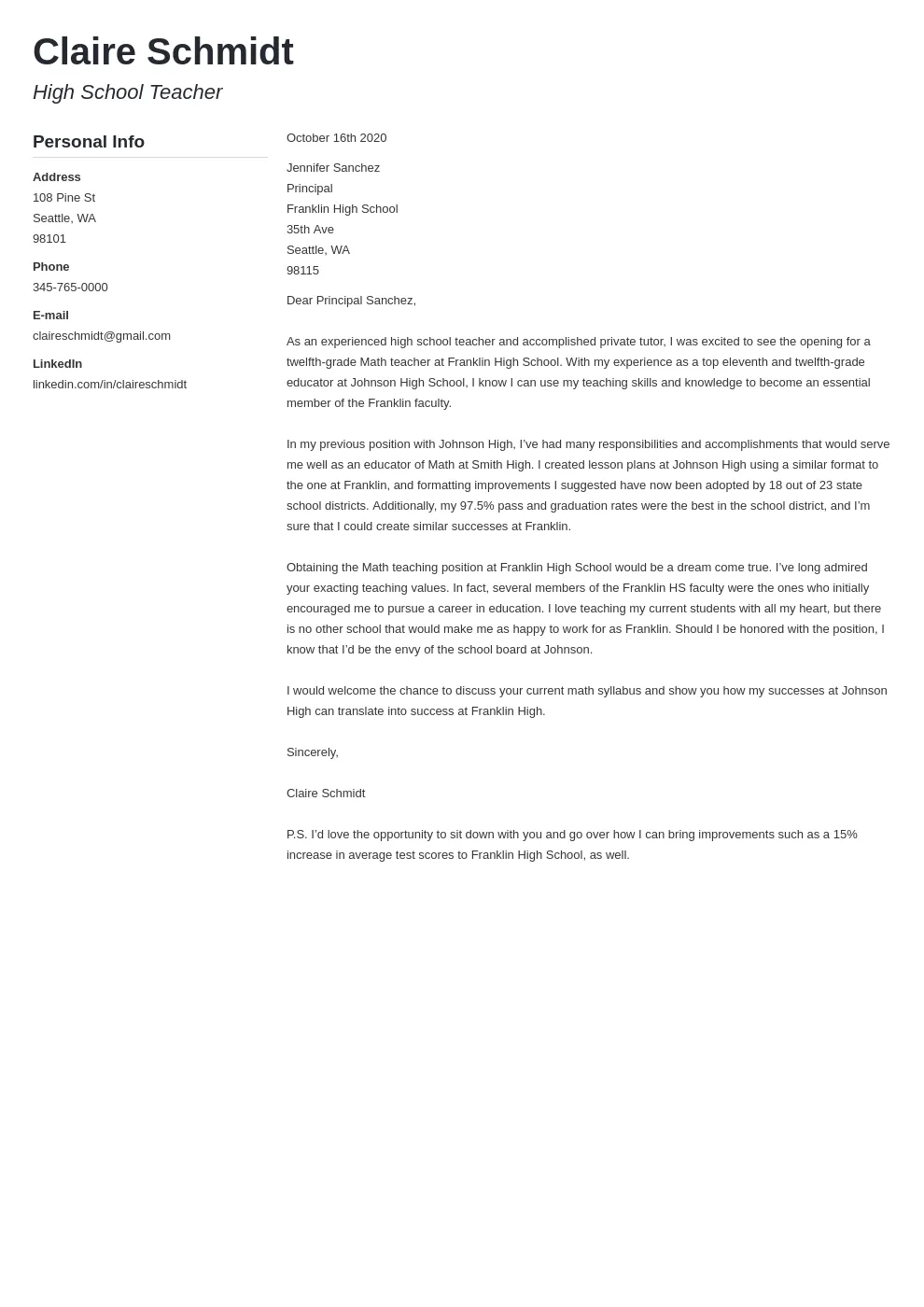
What is a Cover Letter
A cover letter is a crucial document that accompanies your resume when applying for a job. It serves as a personalized introduction, allowing you to showcase your skills, experience, and enthusiasm for the specific role and company. Unlike a resume, which provides a factual overview of your qualifications, a cover letter gives you the opportunity to tell a story, explaining why you are the ideal candidate and how your aspirations align with the company’s goals. It’s your chance to make a strong first impression and persuade the hiring manager to read your resume in detail and consider you for an interview. A well-crafted cover letter can significantly increase your chances of getting noticed and landing your dream job, setting you apart from other applicants.
Why Is a Cover Letter Important
The importance of a cover letter extends beyond simply fulfilling a job application requirement. It is your chance to go beyond the basic facts presented in your resume and demonstrate your genuine interest in the position and the company. A cover letter allows you to explain any gaps in your employment history or highlight transferable skills that may not be immediately obvious from your resume. It provides a platform to express your personality and communication style, giving the hiring manager a sense of who you are as a professional. Furthermore, a well-written cover letter indicates that you have taken the time to research the company and understand their values, demonstrating your commitment and attention to detail. In a competitive job market, a compelling cover letter can be the deciding factor in whether you are called for an interview or your application is overlooked.
Cover Letter Essentials

To create an effective cover letter, you need to understand the key elements that make it compelling and professional. These elements include a clear and concise header, which includes your contact information. Follow this with the recipient’s information, addressing the hiring manager directly, if possible. The opening paragraph should immediately grab the reader’s attention, stating the specific position you’re applying for and briefly highlighting why you’re a strong fit. The body paragraphs are the core of the letter, where you showcase your skills and experience, tailoring them to the job description and quantifying your achievements. The closing paragraph should express your enthusiasm for the opportunity and include a clear call to action, such as requesting an interview. Proofreading is also crucial to ensure your cover letter is free of any errors, which can damage your credibility. Finally, formatting for readability ensures that your cover letter is easy to read.
Header Information
Your cover letter should begin with a well-formatted header. The header typically includes your full name, address, phone number, and email address. Ensure this information is accurate and up-to-date. The header should be positioned at the top of the page, typically left-aligned, and it should be easily readable. Choose a professional font and font size to maintain a polished appearance. If you have a LinkedIn profile, consider including the URL in your header as well. Consistency in formatting is key – the header should match the format of your resume. Using a clean and clear header establishes your professionalism and makes it easy for the employer to contact you.
Recipient’s Information
After your header, include the recipient’s information. This usually includes the name of the hiring manager, their title, the company name, and the company’s address. If you can find the hiring manager’s name, address them directly – this shows you’ve done your research and adds a personal touch. Use online resources such as LinkedIn or the company’s website to find this information. If you are unsure of the hiring manager’s name, use a general salutation, such as “Dear Hiring Manager,” or “Dear [Department] Team.” Addressing your letter to a specific person makes it more engaging and shows that you are truly interested in the position and have taken the initiative to personalize your application.
Opening Paragraph

The opening paragraph is your first opportunity to capture the hiring manager’s attention. Clearly state the position you are applying for and where you found the job posting. Briefly explain why you’re interested in the role and the company. Highlight your key qualifications and skills that align with the job requirements. This paragraph should be concise and enthusiastic, setting the tone for the rest of your letter. Consider mentioning a specific achievement or experience that directly relates to the job. Avoid generic opening statements and instead demonstrate your genuine interest and enthusiasm. A strong opening makes the reader want to learn more about you.
Body Paragraphs
The body paragraphs are the heart of your cover letter, where you showcase your relevant skills, experience, and accomplishments. Use these paragraphs to elaborate on the qualifications you mentioned in your opening. Provide specific examples that demonstrate your abilities. Highlight your achievements by quantifying them whenever possible (e.g., “increased sales by 15%”). Tailor each paragraph to the job description, addressing the key requirements and demonstrating how your skills align with the company’s needs. Use keywords from the job posting to show you’ve read and understood the job requirements. The body paragraphs should tell a story, showing the hiring manager what you can bring to the role.
Highlighting Your Skills and Experience
When describing your skills and experience, focus on those most relevant to the job. Review the job description carefully and identify the key skills and qualifications the employer is seeking. Then, provide specific examples from your previous experiences where you demonstrated those skills. Use action verbs to describe your accomplishments (e.g., managed, developed, implemented). Explain how your skills have led to positive outcomes in previous roles. If you are changing careers, focus on transferable skills that apply to the new position. Highlight any relevant training, certifications, or achievements. Show, don’t just tell, by providing evidence of your abilities. This makes a compelling case for why you should be hired.
Tailoring to the Job Description

One of the most critical aspects of a cover letter is tailoring it to each job application. Customize your cover letter to match the specific requirements of each job posting. Carefully read the job description and identify the key skills, qualifications, and experiences the employer is looking for. Then, use your cover letter to demonstrate how your qualifications align with those requirements. Use the same keywords and phrases that are used in the job description. Provide specific examples from your experience that address the listed requirements. This shows the hiring manager that you have read the job description and understand the role. Tailoring your cover letter significantly increases your chances of getting an interview.
Quantifying Achievements
Whenever possible, quantify your achievements to make your cover letter more impactful. Instead of simply stating that you “improved customer satisfaction,” provide specific numbers, such as “increased customer satisfaction scores by 20%.” Use metrics and data to showcase your successes. Include percentages, dollar amounts, or other measurable results. Quantifying your achievements provides concrete evidence of your skills and abilities. This shows the hiring manager the value you brought to previous roles. By quantifying your achievements, you make your cover letter more credible and persuasive.
Closing Paragraph
Your closing paragraph should reiterate your interest in the position and the company. Express your enthusiasm for the opportunity to contribute to their team. Reiterate your key qualifications and why you are the ideal candidate. Include a call to action, such as requesting an interview. Thank the hiring manager for their time and consideration. Keep the closing paragraph concise and professional. This is your final chance to leave a positive impression. A well-written closing paragraph ensures that the hiring manager remembers you and is motivated to take the next step.
Expressing Enthusiasm

Throughout your cover letter, express your enthusiasm for the position and the company. Show that you are genuinely interested in the opportunity and eager to learn more. Demonstrate your knowledge of the company’s mission, values, and recent achievements. Research the company before you write your cover letter and tailor your language to reflect your understanding of their goals. Use positive and enthusiastic language to create a favorable impression. Avoid sounding generic; instead, make your enthusiasm clear. This helps the hiring manager see that you are motivated and excited about the prospect of joining their team.
Call to Action
Include a clear call to action in your closing paragraph. This tells the hiring manager what you want them to do next. Common calls to action include requesting an interview, expressing your availability for a phone call, or asking for the opportunity to discuss your qualifications further. Be specific and direct, but keep it polite and professional. Ensure your contact information is readily available so the hiring manager can easily reach you. A strong call to action encourages the hiring manager to take the next step, increasing your chances of moving forward in the hiring process. A well-defined call to action makes the application process straightforward for the employer.
Free Online Tools to Create a Cover Letter
Several free online tools can help you create a cover letter. These tools often provide templates, formatting assistance, and guidance to help you write a professional and effective cover letter. These platforms offer user-friendly interfaces and customizable options to suit your needs. Using these tools can save you time and effort while ensuring your cover letter looks polished and professional. By using these tools, you can focus on the content rather than the formatting. Some popular choices include Canva, Zety, Resume.com, and LiveCareer. These tools can be used to design and create professional cover letters without any cost.
Canva

Canva is a versatile graphic design platform that offers a wide range of cover letter templates. Canva’s user-friendly interface allows you to easily customize templates, add your information, and create a visually appealing cover letter. It offers a vast library of design elements, fonts, and layouts to personalize your document. Canva is a great option if you want to create a visually attractive cover letter, and its drag-and-drop editor makes the design process straightforward. While Canva is primarily a design tool, its cover letter templates are professionally designed and easy to adapt to your needs. The platform also offers the ability to download in various formats and integrates with other platforms.
Zety
Zety is a popular online resume and cover letter builder that provides guided assistance. Zety offers various pre-designed templates and step-by-step instructions to help you create a professional cover letter. It provides suggestions for content and phrasing, making it easy to write a compelling cover letter. Zety’s platform helps you tailor your letter to the job description by offering content-specific guidance. The tool checks your cover letter for any errors and provides suggestions for improvement. Its intuitive interface simplifies the writing process, especially for those new to cover letter writing. Zety offers free templates and resources to get you started, making it a great choice for users of all skill levels.
Resume.com
Resume.com is a comprehensive platform that provides tools for both resumes and cover letters. It features a cover letter builder with customizable templates and content suggestions. The platform provides helpful tips and advice on crafting an effective cover letter. The Resume.com cover letter builder is designed to walk you through each section of your cover letter and provides tailored advice based on the job requirements. Its straightforward interface makes it easy to create a professional cover letter in minutes. Resume.com also offers resume-building features, so you can create both documents in one place.
LiveCareer

LiveCareer is another excellent online resource for creating cover letters and resumes. It offers a cover letter builder with a range of templates and writing guides. The platform provides personalized recommendations based on your experience and the job you are applying for. LiveCareer also has a library of example cover letters that you can use as a starting point. Its user-friendly interface and helpful resources make it easier to create a compelling cover letter. The platform’s content suggestions and formatting tools ensure your cover letter is professional and effective. LiveCareer offers free access to basic templates and features.
Using Templates Effectively
When using online templates, it is essential to use them effectively. Choose a template that complements your industry and the type of job you are applying for. Don’t simply fill in the blanks; tailor the template to your specific skills, experience, and the job description. Customize the template with your own information, formatting it correctly. Use the template as a starting point and add your personal touch to make your cover letter unique. Ensure the template is professional and well-formatted. Avoid using a template that looks overly generic. Tailoring the template shows you’ve invested the time to create a polished application.
Customizing Templates to Match Your Needs
While templates provide a structure for your cover letter, customizing them is crucial. Adjust the template to fit your unique needs and highlight your most relevant qualifications. Modify the layout, font, and formatting to align with your personal brand and industry standards. Change the headings and section titles to match the content. Add or remove sections as needed. Replace the placeholder text with your own experiences and accomplishments. Make sure your cover letter reflects your personality and writing style. By customizing the template, you create a cover letter that is both professional and unique to you, which will help you stand out from the competition.
Proofreading and Editing

Proofreading and editing are critical steps in creating a cover letter. Errors in grammar, spelling, and punctuation can damage your credibility and undermine your application. Review your cover letter multiple times, paying close attention to detail. Use spell-check and grammar-check tools, but also read it carefully yourself. Ensure the language flows naturally and the sentences are clear and concise. Ask a friend or family member to proofread your cover letter. They might catch mistakes that you have missed. Eliminating errors and ensuring your cover letter is perfectly polished is crucial. A well-proofread cover letter shows attention to detail.
Ensuring Error-Free Content
To ensure your cover letter is error-free, start by using spell-check and grammar-check tools. However, these tools may not catch all errors, so a careful review is also essential. Read your cover letter aloud to identify awkward phrasing or run-on sentences. Check for consistency in formatting and style. Ensure the language is clear, concise, and professional. Verify that all your contact information is correct. Cross-check the company name, the hiring manager’s name, and the job title. Proofread multiple times to catch any missed errors. A well-written and error-free cover letter demonstrates your attention to detail and commitment to excellence.
Formatting for Readability
Formatting is vital for ensuring your cover letter is easy to read and visually appealing. Choose a professional font, such as Times New Roman, Arial, or Calibri, and use a font size between 10 and 12 points. Use consistent formatting throughout your document, including line spacing and paragraph indentation. Use bullet points to highlight your key skills and accomplishments. Divide your cover letter into clear sections with headings and subheadings. Maintain a generous amount of white space to prevent the document from looking cluttered. A well-formatted cover letter is more likely to engage the hiring manager and make a positive impression.
Saving and Submitting Your Cover Letter
Once you’ve finished your cover letter, it’s time to save and submit it. Choose the right file format and save your cover letter as a PDF or a Word document, depending on the employer’s instructions. If no format is specified, a PDF is generally the safest choice as it preserves your formatting. Name your file using a clear and professional naming convention, such as “YourName_CoverLetter_JobTitle.” Save your cover letter in a secure location on your computer. Review the job application instructions to understand how the employer prefers to receive your cover letter – via email or through an online application system. Following these steps ensures that your application is received and processed smoothly.
Choosing the Right File Format
The file format you choose for your cover letter can impact how it is viewed by employers. PDF (Portable Document Format) is the most widely accepted format for professional documents. It preserves your formatting and ensures your cover letter looks the same on any device or operating system. Word documents (DOC or DOCX) are also acceptable, but the formatting can sometimes shift depending on the version of Microsoft Word used. Always follow the employer’s instructions regarding file format. If no specific format is requested, a PDF is the safest option. Before submitting, double-check that the file is saved correctly, and all formatting is intact.
Sending via Email or Uploading
The method of submitting your cover letter depends on the job application process. If the job posting asks you to email your application, attach your cover letter and resume to the email. In the email body, include a brief message stating your interest in the position and the attached documents. If the application is submitted through an online system, follow the specific instructions. Usually, you will be prompted to upload your cover letter and resume as separate files. Ensure that the file names are clear and professional. Always double-check the application instructions to confirm the preferred submission method. If in doubt, it’s better to err on the side of caution and ask for clarification.
Conclusion
Creating a cover letter online for free is easy with the right tools and strategies. By following the steps outlined in this guide and utilizing the free resources available, you can craft a compelling cover letter that showcases your skills, experience, and enthusiasm for the job. Remember to tailor your cover letter to each job application, highlight your achievements, and proofread carefully. Embrace the power of free online tools to enhance your job search efforts and land your dream job. With a well-crafted cover letter, you’ll be well on your way to making a strong impression and standing out from the competition. Good luck with your job search!