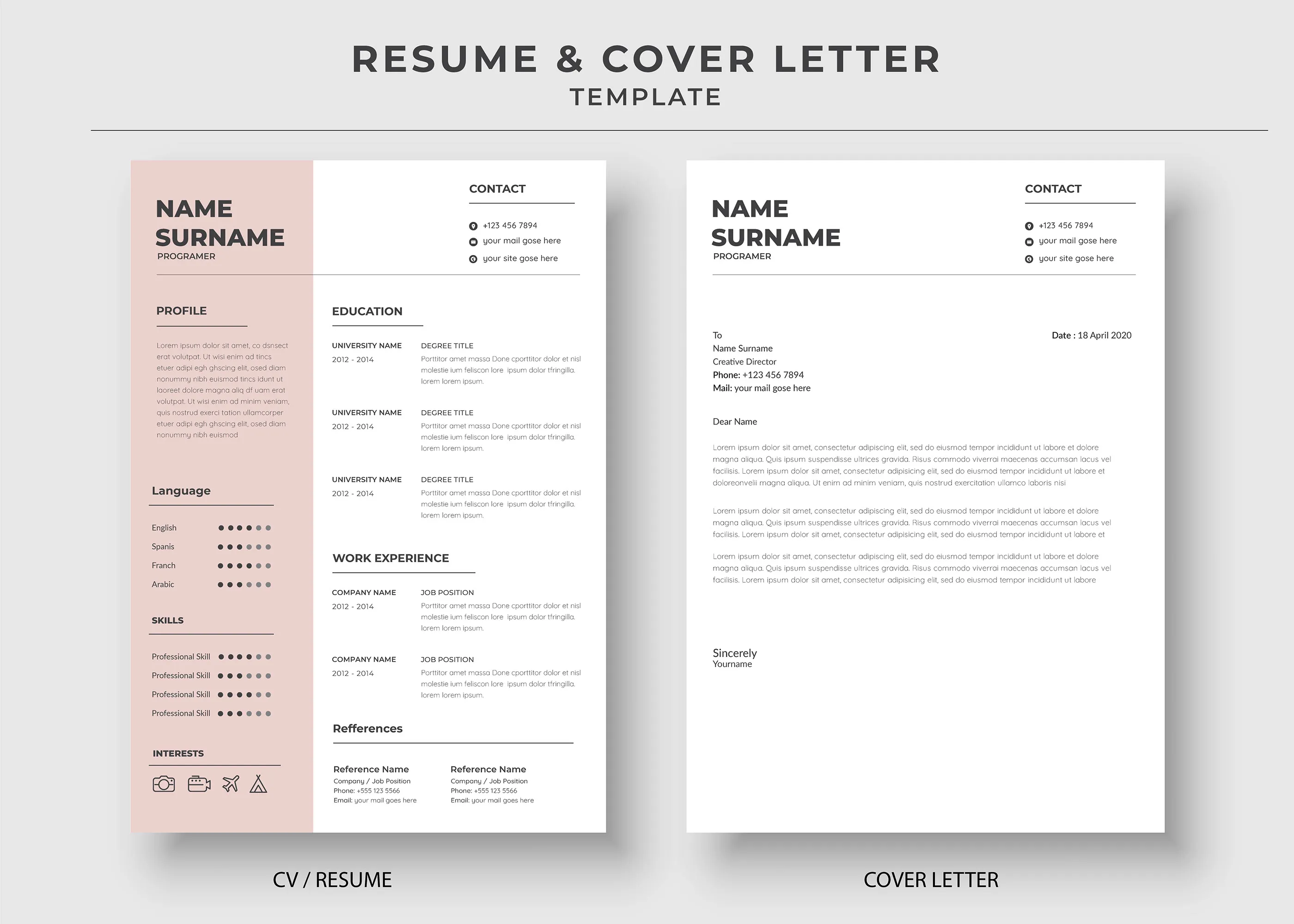
Cover Letter Format: Key Elements
A well-formatted cover letter is your first introduction to a potential employer. It’s your chance to make a strong impression and highlight your qualifications. Paying attention to the format can significantly increase your chances of getting noticed. This guide will walk you through the key elements, ensuring your cover letter is professional, easy to read, and effectively showcases your skills and experience.
Contact Information
At the very top of your cover letter, include your contact information. This usually consists of your full name, address, phone number, and email address. Make sure the email address is professional-sounding; avoid using nicknames or informal language. This section allows the hiring manager to quickly reach you.
Date

Below your contact information, include the date you are sending the cover letter. This helps the employer know when the letter was written and can be important for record-keeping.
Recipient’s Information
Next, provide the recipient’s information. Include the hiring manager’s name (if known), their title, the company name, and the company’s address. Addressing the letter to a specific person shows that you’ve done your research and demonstrates attention to detail. If the name is unavailable, use a professional greeting such as ‘Dear Hiring Manager’.
Salutation
Begin your cover letter with a professional salutation. ‘Dear Mr./Ms. [Last Name]’ is standard. If you don’t know the hiring manager’s name, ‘Dear Hiring Manager’ or ‘Dear [Department Name] Team’ are acceptable alternatives. Avoid overly casual greetings.
Body Paragraph 1 Introduction

In the first paragraph, state the purpose of your letter — the position you’re applying for — and where you found the job posting. Briefly mention why you’re interested in the role and the company. This section should grab the reader’s attention and entice them to read further.
Body Paragraph 2 Skills and Experience
This is the core of your cover letter. Here, highlight your relevant skills and experiences. Explain how they align with the job requirements. Provide specific examples of your accomplishments and quantify your results whenever possible. Tailor this section to each job application, emphasizing the skills and experiences most relevant to the position.
Body Paragraph 3 Closing and Call to Action
In your closing paragraph, reiterate your interest in the position and company. Express your eagerness to discuss your qualifications further. Include a call to action, such as suggesting a follow-up or indicating your availability for an interview. Thank the hiring manager for their time and consideration.
Complimentary Close

End your cover letter with a professional closing, such as ‘Sincerely,’ ‘Best regards,’ or ‘Thank you.’ Choose a closing that reflects the tone of your letter.
Signature
If submitting a digital cover letter, type your full name under your complimentary close. If printing the letter, leave space for your handwritten signature above your typed name.
Resume Format Best Practices
Your resume is a concise summary of your skills, experiences, and achievements. A well-formatted resume is crucial for making a positive first impression and getting your foot in the door. Understanding the best practices in resume formatting will help you present your qualifications effectively and increase your chances of securing an interview. The format should be clear, easy to read, and tailored to the specific job you are applying for.
Contact Information

Similar to your cover letter, your contact information should be at the top of your resume. Include your full name, phone number, email address, and professional-looking LinkedIn profile URL (if you have one). Avoid including your physical address unless it’s specifically requested or relevant to the job.
Summary or Objective
Consider including a summary or objective statement. A summary is a brief overview of your qualifications and experience, useful for experienced professionals. An objective statement describes your career goals, suitable for entry-level candidates or those changing careers. Tailor this section to the specific job, highlighting how your skills and experience align with the employer’s needs.
Skills Section
Create a dedicated skills section to showcase your abilities. List both hard skills (technical skills) and soft skills (interpersonal skills). Group similar skills together and use keywords from the job description to ensure your resume gets past applicant tracking systems (ATS). This section makes it easy for recruiters to quickly assess your qualifications.
Experience Section

List your work experience in reverse-chronological order (most recent first). For each position, include the job title, company name, dates of employment, and a bulleted list of your responsibilities and achievements. Use action verbs to start each bullet point and quantify your accomplishments whenever possible. Focus on results and contributions.
Education Section
Include your education details, such as the degree earned, major, university name, and graduation date. If you have limited work experience, you can place this section before your experience section. You may also include relevant coursework, honors, or GPA (if it’s impressive) to strengthen your profile.
Additional Sections
Consider adding additional sections to highlight relevant information. These might include certifications, awards, volunteer experience, projects, or languages spoken. Tailor these sections to the specific job and showcase any skills or experiences that make you a strong candidate.
Formatting Tools and Techniques

Effective formatting is crucial for readability and professionalism. Using the right tools and techniques can significantly improve the appearance and impact of your documents.
Font Selection
Choose a professional and easy-to-read font. Common options include Arial, Calibri, Times New Roman, and Helvetica. Use a font size between 10 and 12 points for body text, and slightly larger for headings. Ensure consistency in font choice throughout your documents.
Margins and Spacing
Use standard margins (1 inch on all sides) to create a balanced and uncluttered look. Utilize appropriate spacing between lines, paragraphs, and sections to improve readability. Avoid overcrowding the page, and leave sufficient white space to make the document visually appealing.
Use of Headers and Subheadings
Use clear and concise headers and subheadings to organize your content. This helps the reader quickly navigate the document and find the information they need. Use bolding, underlining, or different font sizes to distinguish headers and subheadings from body text. This improves readability and highlights key sections.
File Formats
Save your documents in a widely compatible file format such as PDF (Portable Document Format) to ensure they are displayed correctly on any device. This also prevents formatting issues when the document is opened by the recipient. Only use Word (.doc or .docx) files if specifically requested by the employer.
Proofreading and Editing
Always proofread and edit your cover letter and resume thoroughly. Errors in grammar, spelling, or punctuation can damage your credibility and make a negative impression. Use spell-check and grammar-check tools, but also read the documents carefully yourself. Have a friend or family member review them as well to catch any mistakes you may have missed. Multiple reviews are crucial.
Common Formatting Mistakes to Avoid
Avoid these common formatting mistakes to ensure your documents make a strong positive impression. These mistakes can detract from your qualifications and make it harder for employers to read and understand your message. Avoiding these mistakes can significantly boost your chances of a successful job application.
- Using excessive fonts or font sizes
- Inconsistent formatting throughout the document
- Typos and grammatical errors
- Overly long paragraphs or sections
- Using unprofessional email addresses
- Including irrelevant information
- Ignoring the job description requirements
By carefully formatting your cover letter and resume, you increase your chances of landing an interview and ultimately securing your dream job. Remember to tailor your documents to each specific job application and always proofread carefully before submitting.