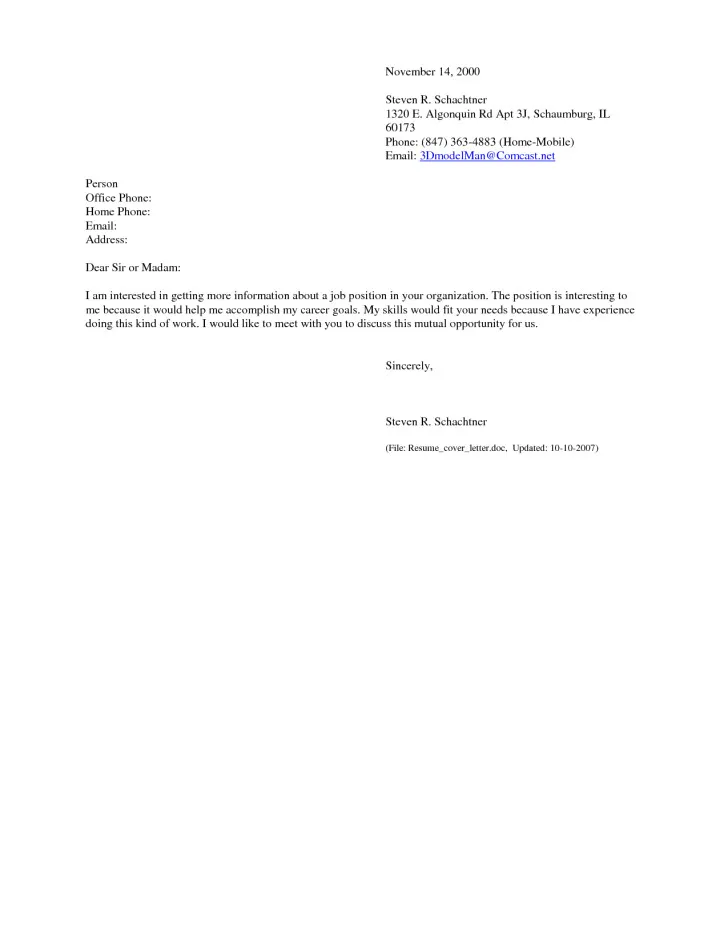
Cover Letter: Email Body or Attachment? The Essentials
The age-old question in the job application process is whether to include your cover letter in the body of your email or attach it as a separate document. Both methods have their advantages and disadvantages, and the ideal choice often depends on the specific job application requirements and your personal preferences. Understanding the nuances of each approach can significantly impact how a recruiter perceives your application and, ultimately, your chances of landing an interview. This guide provides a comprehensive look at both options, offering practical tips to help you make the best decision for your job search and ultimately get hired. Navigating these options is crucial for presenting your best self and making a lasting impression.
Pros of Including Cover Letter in Email Body
Including your cover letter directly in the email body offers several benefits. It can be a convenient and accessible way for recruiters to immediately view your message without the need to open an attachment. This method can be especially useful if the recruiter is quickly scanning through numerous applications. It provides an immediate overview of your qualifications and enthusiasm, which can capture the reader’s attention right away. However, it’s essential to consider the limitations of this approach, particularly concerning formatting and the overall presentation.
Convenience and Accessibility

One of the primary advantages of including your cover letter in the email body is the convenience it offers to the hiring manager. The cover letter becomes immediately accessible, eliminating the extra step of opening an attachment. This can be particularly beneficial if the recruiter is reviewing a large volume of applications. The ease of access might make your application more appealing, as it requires less effort to begin assessing your qualifications. The immediate visibility increases the likelihood that the recruiter will read your letter, leading to a higher chance of getting your foot in the door. Accessibility makes your application user-friendly for the receiver.
Immediate Engagement
By placing your cover letter in the email body, you capture the recruiter’s attention right from the start. The message is delivered instantly, and the recipient can begin reading without any delay. This can be a powerful advantage, as you can immediately convey your enthusiasm and highlight your key qualifications. The direct approach allows you to create an initial positive impression, encouraging the reader to engage with your application. This technique is a great opportunity to make your mark before the recruiter dives into the details of your resume. Ensure you make this count with a compelling and engaging introductory paragraph.
Cons of Including Cover Letter in Email Body
Despite the advantages, including your cover letter in the email body presents certain drawbacks. Formatting limitations and the risk of your application being overlooked are critical considerations. The appearance and structure of your cover letter can be compromised due to email formatting constraints. Furthermore, there is a chance that the recruiter may not read the letter if it is not prominently displayed or easily accessible. Therefore, it’s vital to assess the trade-offs carefully before deciding to use this approach.
Formatting Limitations

Email formatting can pose a significant challenge. The layout and visual appeal of your cover letter can be affected by the email service’s default settings. Fonts may change, spacing may be inconsistent, and overall design elements can be lost in translation. This can make your cover letter appear less polished and professional. When you consider email formatting, ensure your message remains easy to read. Consider this limitation when you’re deciding between email body and attachment.
Risk of Being Overlooked
In the hustle and bustle of a recruiter’s day, your cover letter in the email body could get overlooked. If the email is long, your cover letter might be pushed below the initial view, resulting in a missed opportunity. In addition, some recruiters might not read the email body at all, as they may be focused solely on attachments. This possibility highlights the importance of considering all scenarios. Think about how to ensure that your message grabs their attention from the moment they open the email, while understanding that this method is not guaranteed to work.
Pros of Attaching a Cover Letter
Attaching your cover letter provides a more professional presentation and preserves the intended formatting. This method allows you to showcase your writing skills and attention to detail, which can be crucial in making a positive first impression. Preserving the formatting is critical to displaying your professional image to the hiring manager. When you opt for an attachment, your cover letter can have a more polished appearance, making it a solid option for job seekers.
Professional Presentation

Attaching your cover letter as a separate document allows you to present your application in a polished and professional manner. You can meticulously control the formatting, including fonts, spacing, and overall layout. This level of control is vital for showcasing your attention to detail and commitment to excellence, which will lead to a great presentation. A professionally formatted cover letter will reflect positively on your skills and suitability for the role, while making a great first impression.
Preservation of Formatting
When you attach your cover letter, you ensure that the formatting remains intact. This means that the layout, font choices, and overall design you carefully crafted will be displayed as intended by the recruiter. The original format is critical when it comes to making a solid impression. By preserving the formatting, you prevent any potential distortions or misinterpretations that may arise from email formatting. This preservation helps you maintain control over how your application is perceived, adding to your professional presentation. This is an essential consideration when preparing your application.
Cons of Attaching a Cover Letter
Even though there are advantages, attaching your cover letter can present a few potential drawbacks. The application might be missed if the recipient does not realize it is present as an attachment. Additional steps are required for the recruiter, which could lead to fewer views if they’re busy. These factors should be considered when determining how to send your application. Knowing these considerations will help you make the best choice for your situation.
Potential for Being Missed

There’s a possibility that the recruiter may not open or even notice your cover letter attachment. If the email is focused on the resume, the cover letter might be overlooked in the process. This means that all the effort and detail that you’ve put into your cover letter might be wasted. This can be especially true if the email is part of a large batch of applications. It highlights the importance of writing a concise and compelling email message to draw attention to the attachment, increasing the chances that the recruiter will engage with your application.
Extra Step for the Recruiter
Attaching a cover letter adds an extra step for the recruiter, requiring them to open a separate file. In an environment where recruiters are often inundated with applications, the additional effort might lead to a slight delay in processing your application or a chance that it is missed. While this might seem minor, it’s important to consider the workload and priorities of the recruiter. Make sure that the extra step is worth it by including a compelling message in your email, which prompts the recruiter to open the attachment. This will increase your chances.
Best Practices for Formatting Your Cover Letter
No matter whether you include your cover letter in the email body or as an attachment, well-formatted content is essential. Choosing the right font, ensuring readability through proper spacing, and selecting the appropriate file format can all play a role in determining how the recruiter perceives your application. Focusing on these formatting elements can greatly enhance your chances of making a great impression.
Font Selection and Readability

Choose a professional and easy-to-read font, such as Times New Roman, Arial, or Calibri. Avoid using overly decorative or unusual fonts that may be difficult for the recruiter to read. The font size should be between 10 and 12 points to ensure readability. Make sure that your font is easily readable and reflects your attention to detail. Proper font selection is key to helping the recruiter read your letter.
Margins and Spacing
Use standard margins (1 inch on all sides) to give your cover letter a clean and balanced appearance. Use single-spacing within paragraphs and double-spacing between paragraphs to improve readability. Proper spacing makes the document easier to read, which in turn shows your attention to detail and makes your application more inviting to the hiring manager. This will help make your cover letter more appealing and professional.
File Format and Size
When attaching your cover letter, save it in PDF format to preserve the formatting and ensure compatibility across different devices. Keep the file size under 1 MB to avoid any issues with email servers or download times. PDF is a popular format because it guarantees that your layout will appear as intended on any device. Additionally, make sure your file size is optimized for ease of download. These are critical best practices for getting hired. A well-formatted cover letter will boost your chances of success.
How to Optimize Your Cover Letter for Applicant Tracking Systems (ATS)
Many companies use Applicant Tracking Systems (ATS) to screen job applications. Understanding how to optimize your cover letter for these systems is essential to increase your chances of being selected for an interview. Focusing on keywords, formatting, and tailoring your content will help you navigate the complexities of ATS and stand out. Following these tips can significantly improve your chances of getting your cover letter read by a human.
Keywords and Phrases
Research the job description and identify the keywords and phrases the employer uses. Incorporate these keywords naturally throughout your cover letter to increase the chances of your application being flagged by the ATS. Avoid keyword stuffing, as it can make your letter appear unnatural and less effective. Include these keywords throughout your cover letter in a natural, concise way to pass through the ATS.
Formatting for ATS Compatibility
Use a simple, clear, and easily readable format. Avoid using tables, graphics, or images, as these elements can confuse the ATS. Use standard fonts and a clear layout to ensure that your cover letter is accurately parsed. When your cover letter is optimized for ATS, it shows you understand the modern job application process. Keep it simple and straightforward to increase the chances of your application making it through the first screening.
Cover Letter Writing Checklist
Before submitting your cover letter, use this checklist to ensure that you have covered all the essential elements and that your document is free from errors. Double-checking these aspects will significantly increase your chances of making a favorable impression.
Proofreading and Editing
Thoroughly proofread your cover letter for any grammatical errors, spelling mistakes, or typos. Ask a friend or colleague to review your letter for a second opinion. Correcting any errors will reflect your attention to detail and professionalism. Make sure that your cover letter is polished, error-free, and ready to impress the hiring manager. Before sending, proofread one last time for errors.
Tailoring to the Specific Job
Customize your cover letter for each job application by highlighting the skills and experiences that match the job requirements. Show your genuine interest in the specific role and company. By customizing your cover letter for each job, you show the hiring manager that you understand the role and organization. This is a key element in writing an effective cover letter.
Contact Information
Include your full name, phone number, email address, and LinkedIn profile URL. Ensure that your contact information is up-to-date and easily accessible. Making this information readily available makes it easier for the recruiter to reach you. Providing contact information in the right format is crucial for job-seeking success.
Conclusion
Deciding whether to include your cover letter in the email body or as an attachment depends on your priorities and the specifics of the job application. Weighing the pros and cons and following best practices for formatting and optimization are crucial. With this guide, you can navigate these complexities and create a compelling cover letter that effectively showcases your qualifications and increases your chances of landing your dream job. Remember to always tailor your approach to the specific requirements of each job application to ensure your cover letter stands out. Good luck!